
No website required
Create and share a payment link right from the Flute dashboard.
Create a payment link in minutes, share it anywhere, and get paid. No developer, no website, no waiting.
Create and share a payment link right from the Flute dashboard.
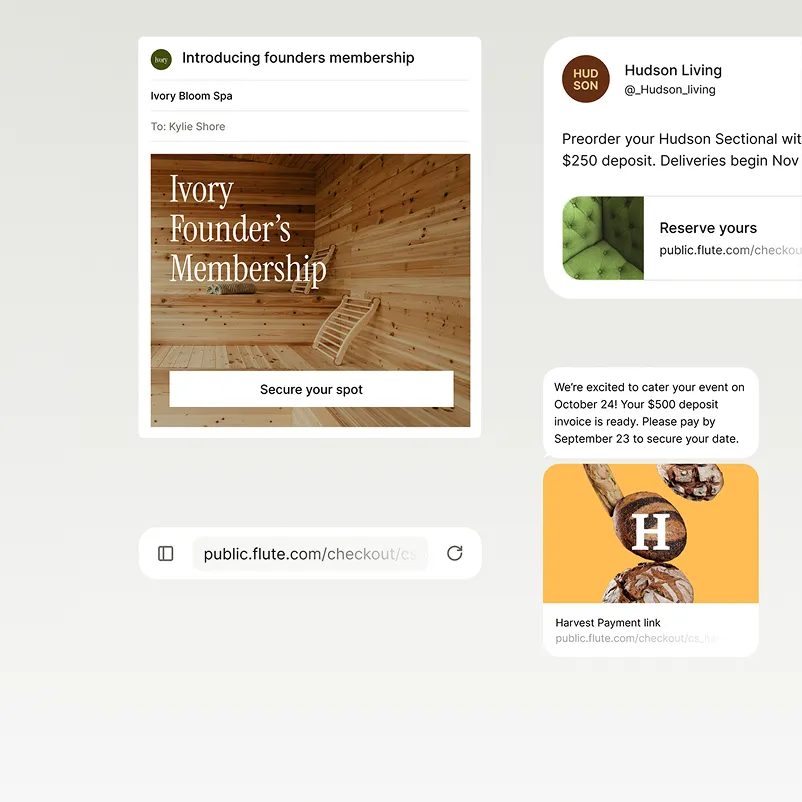
Text it, email it, share it on social, or embed it on any page.
Choose the payment link you need – fixed amount, flexible amount, or standard checkout.
View each link’s status, payment count, and totals from a single convenient dashboard.
“Taking credit card payments upfront is an important part of our process, so we need transactions handled smoothly and support available when questions come up. Flute has been a valuable partner for our organization, and the team has always been responsive and easy to work with.”
Add a link to your social bio or email and turn any channel into a checkout.
Create a link on-site, text it to the customer, and get paid before leaving.
Send a link before your event to collect deposits, pre-orders, or ticket payments in seconds.
Let customers pay directly from their bank account online or via a payment link, all within your existing checkout flow.
Send payment links with a fixed amount for known totals, a flexible amount so the customer enters what they owe, or a standard checkout for open amount flows. Customers can pay by card or ACH.
Learn moreManage payment link activity through one convenient dashboard. Deactivate links the moment they’re no longer needed, mark them as single-use, or reuse them across campaigns.
Learn moreSimple pricing for payment links
Flute’s ACH processing fees are significantly lower than standard credit card rates. The savings are most noticeable on high-ticket transactions and recurring billing, where card fees add up over time.
A payment link is a shareable URL that takes customers to a secure checkout page to pay. Businesses can create them from the Flute dashboard in under a minute, no website or developer required.
Create a link from your Flute dashboard, then send it via text or email, post it on social media, or add it to any webpage. Customers tap on the link and pay on a mobile-ready checkout page.
Yes. The Flute dashboard shows every link’s status, the number of payments received, and the total collected. Deactivate any link the moment it’s no longer needed.
Log in to your Flute dashboard, enter an amount and description, choose a link type, and your link is ready to share. The whole process takes under a minute.
Customers can pay with any major credit or debit card or ACH. Checkout is mobile-ready and works on any device.
Create a payment link in under a minute and start getting paid — no website required.